Recommended Practice

This tutorial shows how to use
@parl.remote_class to implement parallel computation with multi-threads.Python has poor performance in multi-threading because of the GIL , and we always find that multi-thread programming in Python cannot bring any benefits of the running speed, unlike other program languages such as
C++ and JAVA.Here we reveal the performance of Python threads. At first, let’s run the following code:
class A(object):
    def run(self):
        ans = 0
        for i in range(100000000):
            ans += i
a = A()
for _ in range(5):
    a.run()
This code takes 17.46 seconds to finish counting from 1 to 1e8 for five times.
Now let’s implement a thread-based code using the Python library,
threading, as shown below.import threading
class A(object):
def run(self):
ans = 0
for i in range(100000000):
ans += i
threads = []
for _ in range(5):
a = A()
th = threading.Thread(target=a.run)
th.start()
threads.append(th)
for th in threads:
th.join()
It takes 41.35 seconds, much slower than previous code that finish counting serially. As the performance is limited by the GIL, there is only a single CPU running the task, and the CPU has to spend additional time on switching tasks between different threads.
Finally, let’s try to use PARL:
import threading
import parl

@parl.remote_class
class A(object):
    def run(self):
        ans = 0
        for i in range(100000000):
            ans += i
threads = []
parl.connect("localhost:6006")
for _ in range(5):
    a = A()
    th = threading.Thread(target=a.run)
    th.start()
    threads.append(th)
for th in threads:
    th.join()
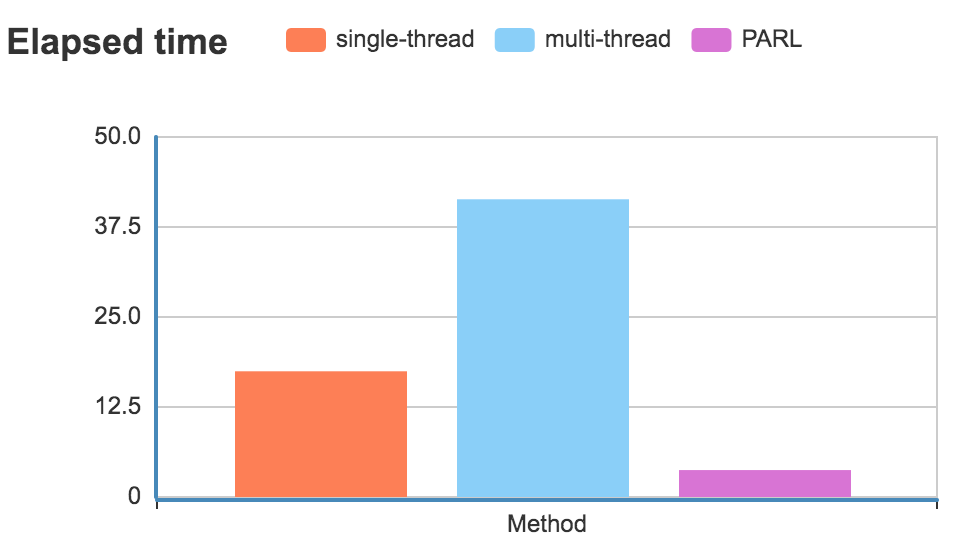
Only 3.74 seconds are needed !!! As you can see from the code above, it is the
@parl.remote_class that makes the change happen. By simply adding this decorator, we achieved real multi-thread computation.In our next tutorial, we are going to show how to implement parallel computation without multithreading.